Quality Score
A single dashboard summarizing how production-ready your animation is — at a glance, like an Apple Watch fitness ring.
Tier: Builder Pro Menu:
Physics → 📊 Quality Score
What it does
Animation quality is hard to eyeball. A clip that "looks fine" can have invisible foot sliding, subtle joint hyperextension, asymmetric balance, or non-smooth interpolation that makes it feel "off" without being able to point at why.
Quality Score samples your animation across the timeline and produces a single composite score plus per-metric breakdowns. The headline visualization is a ring dashboard — rings filling toward 100% as your animation gets healthier.
The scored metrics:
| Metric | Targets |
|---|---|
| Smoothness | Minimal acceleration spikes, no jitter |
| Joint Limits | No bone hyperextended past anatomical bounds |
| Foot Contact | No foot sliding when a foot is grounded |
| Loop | The clip's end flows back into its start without a pop |
| Balance (CoM) | Center of Mass stays over the support polygon (avatar isn't falling) |
Each metric gives a percentage. The overall Quality Score is a weighted average tuned to match how a senior animator would rate the clip subjectively.
All ground/motion metrics are measured in world space as of v1.1 — where the bones actually are in the scene, feet against the real floor. (Previously several metrics read local bone offsets, which made the scores largely decorative.) Smoothness, Foot Contact, Loop, and Balance now reflect what you actually see in the viewport — and Fix All no longer mangles legs: its foot pass runs in world space and only fires when sliding was actually detected. Results appear as an inline status line in the panel, not popup toasts.
How it samples
Quality Score uses a sample-on-demand pattern — it doesn't need pre-baked metric data, it doesn't need explicit keyframes at every frame. When you open the panel:
- The current animation is sampled across all frames using a clone of the live mixer (the mixer's actual state is untouched, so playback isn't affected).
- Per-frame measurements are taken: bone world positions, velocities, joint angles, foot heights, CoM position vs. support polygon.
- Metrics are aggregated and the rings fill in real time.
Total time: typically <200ms for a 60-frame clip on a typical humanoid rig. You see the result almost instantly.
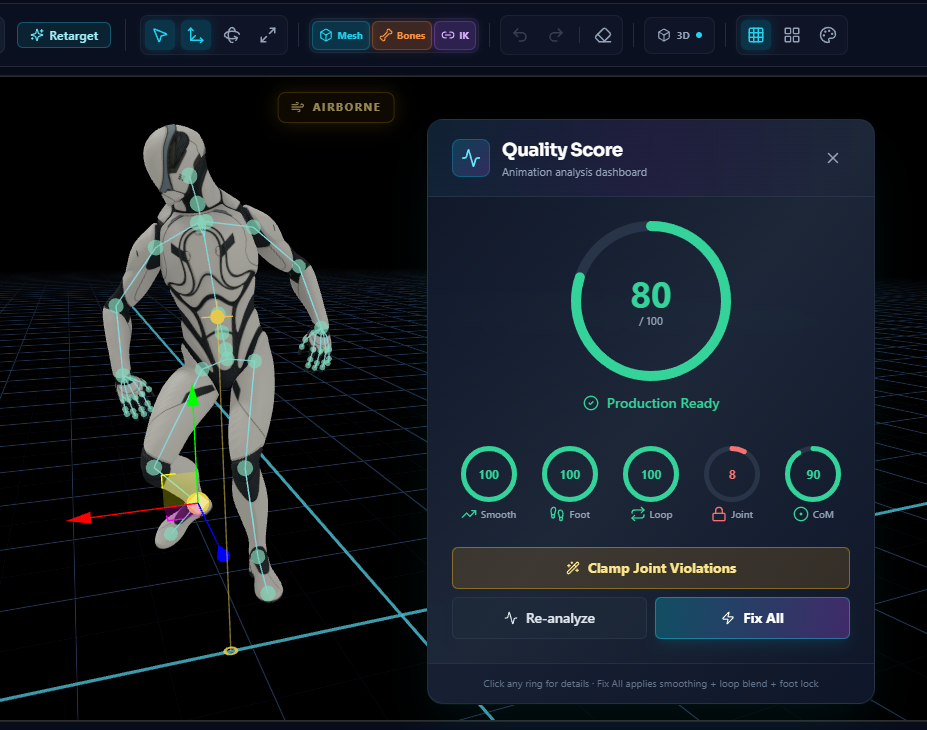
The Quality Score dashboard. The big ring is the composite score; the four small rings break down each metric. In this clip everything looks great except Joint Limits — a single red ring tells you instantly where the artifact is. Click Fix All to apply smoothing + loop blend + foot lock in one pass, or Clamp Joint Violations to handle just that metric.
The sample is isolated — running Quality Score never disturbs whatever else you're doing. You can open it mid-edit and close it without losing state.
Reading the rings
Each ring fills clockwise from 12 o'clock:
    100%
     ▲
0%   │   25%
◄────┼────►
     │
   Empty
- Empty / partial fill (red zone, ~0-40%): the metric is failing — there are clear quality issues that an audience would notice.
- Half full (amber zone, ~40-70%): borderline. Intermediate quality. A pro animator would polish further; a casual viewer might miss the issues.
- Almost full (green zone, ~70-95%): production quality. Send-to-client material.
- Full ring (100%): mathematically clean. Often unrealistic for organic motion (real animation has natural micro-imperfections).
Hovering each ring surfaces the actual numbers — e.g. "Smoothness: 87% — peak acceleration 2.3 u/s² at frame 14".
Per-metric drill-down
Click any ring to drill into that metric's report.
Smoothness Report
Lists the frames with the highest acceleration spikes. Each entry shows the bone, frame, peak acceleration value, and a "go to frame" link that scrubs the timeline. Useful for catching tweens that aren't smoothing properly (often a quick Bezier or Squad interpolation switch fixes it).
Joint Limits Report (also in Physics menu directly)
Lists every bone that hyperextended (rotated past anatomical limits) sorted by frequency. Each entry shows the bone, the count of frames it was over-extended, and the worst-frame angle. Can be reached directly via Physics → Joint Limits Report. See the Joint Limits page for the dedicated workflow.
Foot Locking Report
Lists the foot bones, total grounded frames, and the skating distance — how much each foot drifted across the floor while it should have been planted. Skating greater than ~0.05 units per grounded frame is visible to the viewer. See the Foot Locking page for the live correction tool.
Balance Report
Lists frames where the avatar's Center of Mass drifted outside the support polygon (the convex hull of foot contact points). Avatars in mid-air are exempt. See the Center of Mass page for live visualization.
When to run it
- Right after import — see how the source clip rates before you touch it.
- After Mirror or Loop Fixer — confirm the polish operation didn't introduce new artifacts.
- Before export — final pre-flight check. If all rings are green, you're shipping production-grade.
- As a teaching tool — for new animators, the rings make abstract motion-quality concepts concrete.
Workflow — "from 60% to 95%" tightening
- Import your animation.
- Open Quality Score. Note the overall percentage and which rings lag.
- Worst ring is, say, Foot Locking 45%. Open
Physics → Foot Locking, tune the threshold, watch the skating drop. - Re-run Quality Score. Foot Locking ring now reads 88%. Balance ring slipped slightly because foot lock changed CoM trajectory — that's expected.
- Address the next-worst ring (probably Smoothness). Check the spike report, switch quaternion interpolation on the offending tracks.
- Re-run. Iterate until all rings are green.
This gradual-tightening loop is the reason Quality Score exists — it makes "polishing an animation" feel like leveling up a stat, not a vague art exercise.
Edge cases
No animation loaded
If clipData is null and there's no legacy mixer, the rings stay at 0% with a banner explaining no data. Same as other Polish/Physics tools — no crash.
Very short clips (under ~5 frames)
Some metrics (especially smoothness) need a window to compute. Clips under ~5 frames fall back to "insufficient data" with a hint to add more keyframes.
Static poses
If every track has only one keyframe (a static pose with no motion), Smoothness defaults to 100% (nothing to be jerky), Foot Locking defaults based on whether feet touch ground in the static pose, Joint Limits checks the single frame, Balance checks CoM at that frame.
Sample-on-demand cost on huge rigs
Rigs with 200+ bones and clips with 600+ frames push sample time toward ~1 second. The UI shows a brief spinner; not blocking.
Related
- Foot Locking — the live correction tool that pulls Foot Lock score up
- Joint Limits — diagnostic report for hyperextension
- Center of Mass — Balance metric's live visualization counterpart
- Mirror Animation — run Quality Score after mirror to confirm no new artifacts
- Loop Fixer — Quality Score will spot any seam-induced spikes