Center of Mass + Support Polygon
Live balance visualization that tells you whether your character is standing or falling.
Tier: Builder Pro Menu:
Physics → Center of Mass
What it does
Real bodies stay upright when their Center of Mass (CoM) stays vertically above the support polygon — the convex hull formed by the contact points of whatever's touching the ground (typically feet). When the CoM drifts outside the support polygon, the body falls.
Animation often violates this without the animator noticing. A standing pose with shifted weight reads as "off-balance" even if you can't articulate why. A walk cycle with the CoM swaying outside the support polygon reads as comically tipsy.
This tool gives you three live visualizations, all rendered in real time during playback:
1. Center of Mass (the CoM marker)
A floating sphere or cross-hair anchored at the avatar's calculated center of mass. CoM is computed from per-bone mass estimates — the head, torso, hips contribute most; arms and legs contribute proportionally.
2. Support Polygon
A translucent polygon drawn on the floor connecting the contact points (feet, hands if used as supports, knees if kneeling). The polygon updates every frame as the contact points shift.
3. Balance Pill HUD
A small pill-shaped indicator anchored to the top center of the viewport. Changes color based on balance status:
| Status | Color | Meaning |
|---|---|---|
| Balanced | Green | CoM is comfortably inside the support polygon |
| Borderline | Yellow | CoM is near the polygon edge — weight shifting, edge of stability |
| Falling | Red | CoM is outside the polygon — character is technically falling |
The pill is the most glanceable check during playback. Watch the color while the animation plays — if it stays mostly green with brief yellows during weight shifts, the animation is biomechanically valid. If it stays red, the character is in a perpetual fall.
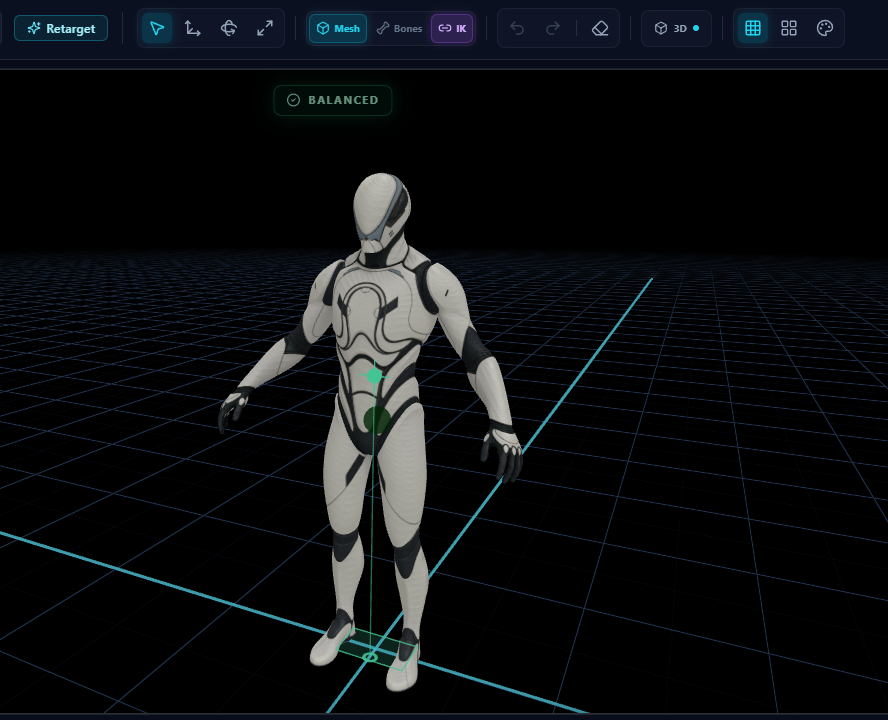
A balanced standing pose. The green Support Polygon connects both feet on the floor; the green CoM marker sits comfortably above it; the HUD reads BALANCED.
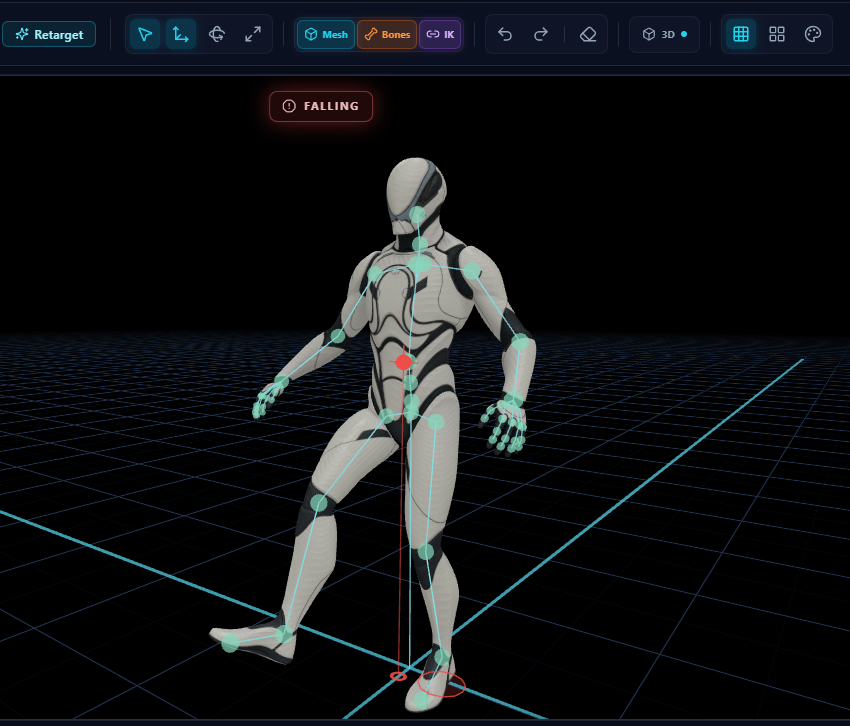
The same character a moment later, leaning forward past the Support Polygon. The CoM marker turns red, the HUD flips to FALLING, and the visualization tells you instantly that this pose is biomechanically tipping over — even when the silhouette alone might fool you.
How CoM is computed
Per-bone mass values are based on standard biomechanics body-segment-mass tables (the percentages of total body mass attributed to each major segment for an average adult human):
| Segment | Mass % |
|---|---|
| Head | 8% |
| Torso | 50% |
| Pelvis (included in torso) | 14% |
| Upper arms (each) | 2.8% |
| Forearms (each) | 1.6% |
| Hands (each) | 0.6% |
| Thighs (each) | 10% |
| Shins (each) | 4.5% |
| Feet (each) | 1.4% |
Per frame, the CoM is the mass-weighted average of each segment's centroid in world space:
CoM = Σ(segment_mass_i × segment_centroid_i) / Σ(segment_mass_i)
For non-human rigs (where the segment names don't match), the system falls back to averaging bone positions weighted equally — less accurate, still informative.
How the Support Polygon is computed
Each frame:
- Identify contact bones — feet by default; can be extended to hands when the avatar is in a push-up or crawl pose.
- Get world XZ position of each contact bone, projected to the floor (Y = floor height).
- Build convex hull of the projected positions.
- Render as a translucent polygon on the floor.
When only one foot is grounded, the support polygon collapses to a single point — single-foot balance is mathematically a knife-edge, biomechanically valid only briefly.
Reading the visualizations during playback
Walk cycle
- Stride forward → support polygon shifts forward, CoM should stay just behind/over the leading foot during the contact phase.
- Mid-stride → momentarily on one foot; pill goes yellow during the swing phase, that's normal.
- Heel strike → polygon rebuilds with both feet planted, pill goes green.
Standing idle
- Pill should stay solid green throughout. If it flickers yellow, the idle has subtle CoM sway — usually intentional (breathing, weight shift) but worth confirming.
Action animations
- Punches, kicks, throws all involve dramatic CoM travel. The pill should go yellow and even briefly red during attack windups — that's why these moves require committed weight transfer in real life. If the pill stays green throughout an attack, the move is too "weightless" and reads as unimpactful.
Jumping / aerial sequences
- When both feet leave ground, the support polygon disappears. CoM is in free flight — pill goes neutral / off (no balance constraint applies in the air).
Workflow — using CoM as a teaching tool
This visualization is incredibly powerful for teaching weight in animation:
- Animate a standing-to-sitting transition.
- Toggle Center of Mass on.
- Play. Watch the CoM marker.
- If the CoM jumps from "over feet" to "over chair" instantly, the transition lacks the realistic forward lean.
- Add 2-3 keyframes of forward torso lean. The CoM should travel smoothly from feet → chair, staying within the support polygon at every moment.
- Re-watch. Pill stays green throughout. Animation now reads as a real human sitting down, not teleporting onto a chair.
Edge cases
Floating CoM (avatar partially flying)
For wing/jetpack rigs where the avatar is half-suspended, CoM math still computes but the support polygon may be tiny or empty. The pill will read red even though the character is "supposed" to be airborne. Disable CoM for such rigs.
Multi-character scenes
Currently CoM tracks the active avatar only. For scenes with multiple characters, switch active avatar to validate each independently.
Custom mass distributions
The default mass table assumes adult human proportions. For child characters, very tall/short rigs, or stylized proportions, the absolute CoM may shift slightly. Relative motion (the trajectory of the CoM through the clip) is still meaningful.
Related
- Foot Locking — when feet are properly locked, the support polygon updates accurately
- Quality Score — Balance is one of the four scored metrics, driven by CoM-vs-polygon
- Joint Limits — together with CoM, the full professional-grade biomechanics validation set
- Jiggle Bones — soft-body physics for clothing/hair, layers cleanly atop CoM-validated motion