Kinetiq Engine Overview
Kinetiq Engine is a browser-native hybrid synthesis system that transforms raw AI-generated motion into editable animation assets.
Kinetiq Engine ships incremental updates frequently. The features documented on this page are live in production. Items marked 🚧 are in active training and will surface post-launch. See the Roadmap for the full picture.
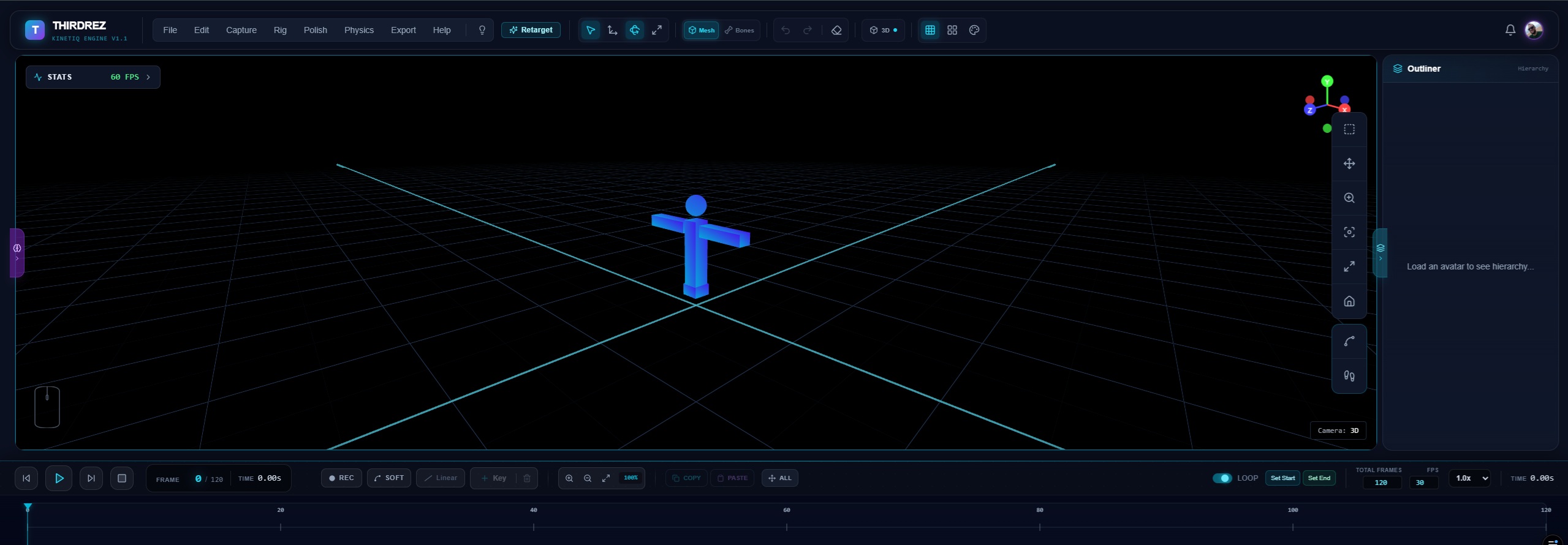
The Kinetiq Engine v1.1 editor running in-browser — a full animation studio with no installation required. The top menu groups every workflow (Capture, Rig, Polish, Physics, Export); the right edge hosts the camera/tools toolbar and the Outliner; the bottom is your timeline and transport. The stats chip confirms a steady 60 FPS.
The Gelatin Problem
While generative motion models can synthesize human movement from text, they consistently underperform in production environments. Outputs frequently suffer from critical physics failures:
| Artifact | Cause | Frequency |
|---|---|---|
| Foot sliding | Lack of IK constraint during synthesis | 70-90% of locomotion |
| Joint hyperextension | Training data includes noisy mocap | 30-50% of sequences |
| Interpenetration | No collision detection during generation | 40-60% of interactions |
| Unnatural timing | Gaussian smoothing over keyframes | Nearly universal |
| Root drift | Accumulating positional error | 80%+ for >3 seconds |
We call this the "Gelatin Problem"—motion that looks plausible but lacks weight and deterministic contact.
Our Solution
Kinetiq Engine addresses the Gelatin Problem with a tiered approach:
- Editor + retarget (✅ live) — load any clip, retarget across rigs, edit in browser
- Physics tools (✅ live) — Foot Locking (with Bake to Timeline), Joint Limits, Center of Mass, Quality Score, Jiggle Bones (with Bake to Timeline)
- Polish tools (✅ live) — Mirror Animation (free), Smooth, Simplify Keyframes, Range, Loop Fixer, Trajectory View
- AI capture (✅ live) — Vision Capture for webcam + video pose extraction
- Generative motion (🚧 in training) — Amanda Co-Pilot (MDM/LoRA) for prompt-to-motion synthesis
System Architecture
The pipeline available in production today processes motion through three stages:
Import / Capture → Refine → Export
Stage 1: Import, Rig or Capture
Entry points that get a character moving in the editor:
- File import — GLB, FBX (avatar import), BVH, plus Mixamo/SL/Unity/UE5/Roblox preset rigs
- Auto-Rig — drop any humanoid mesh and it rigs itself (skeleton + skin weights), ready to animate — you never place a bone. See Auto-Rig
- Retarget Studio — apply animation from one rig onto another with bone mapping
- Vision Capture — webcam or video file → mediapipe pose estimation → 3D skeleton
Stage 2: Refine
Automated and manual correction passes including:
- Polish menu — Mirror Animation, Smooth, Simplify Keyframes, Range, Loop Fixer
- Physics menu — Foot Locking (bake-able), Joint Limits, Center of Mass, Quality Score, Jiggle Bones (bake-able)
- Manual editing — keyframe, IK, transform tools, onion skinning, Trajectory View, true orthographic Front/Side/Top views
Stage 3: Export
Refined motion exports to standard formats:
| Format | Target Platform | Features | Status |
|---|---|---|---|
| GLB / glTF 2.0 | Unity, Unreal, Roblox, Web, AR/VR | Embedded skinning + animation tracks | ✅ Live |
| BVH | Second Life Bento, MotionBuilder, Maya | Full skeletal hierarchy, loop metadata | ✅ Live |
.anim (Second Life) | Second Life Linden Lab native | Direct in-world upload format | ✅ Live |
| FBX | Maya, Blender, MotionBuilder, Unity, Unreal | Binary FBX 7.4, client-side, per-DCC axis/unit presets | ✅ Live |
Performance (target)
Browser-native means performance varies with hardware. Targets on a commodity laptop (Intel Core i7-12700H, 16GB RAM, Chrome):
| Operation | Target Latency |
|---|---|
| GLB import | < 200 ms (most clips) |
| Mirror Animation full clip | < 30 ms (50 bones, 100 frames) |
| Loop Fixer blend | < 20 ms |
| Quality Score sample-on-demand | < 50 ms per pass |
| GLB export | < 200 ms (most clips) |
Comprehensive benchmarks across rig sizes and clip lengths will publish with our 2026 whitepaper update. Current numbers above are working targets from internal profiling.
Artifact Reduction (professional physics suite)
The Physics menu surfaces tools that target the most common AI-generated motion artifacts:
| Artifact | Tool that addresses it | Status |
|---|---|---|
| Foot sliding during locomotion | Foot Locking (live constraint) | ✅ Live, Builder Pro |
| Joint hyperextension | Joint Limits Report + clamp | ✅ Live, Builder Pro |
| Loss of balance / unnatural CoM | Center of Mass + Support Polygon | ✅ Live, Builder Pro |
| Loop discontinuity ("pop") | Loop Fixer (snap or smoothstep blend) | ✅ Live, Builder Pro |
| Bilateral asymmetry | Mirror Animation (3 modes + strength) | ✅ Live, free for all |
| Mocap jitter / harsh arcs | Smooth (stackable, Region-aware) | ✅ Live |
| Skirt / hair / accessory rigidity | Jiggle Bones (Kinetiq Physics — Verlet, bakes to timeline) | ✅ Live, Builder Pro |
Quality Score in the Physics menu summarizes the overall animation health into an Apple-Watch-style ring dashboard, highlighting which artifact category needs attention for any given clip.
Next Steps
- Editor Guide - Learn to use the Kinetiq Editor
- Platform Support - Supported skeleton standards
- Style LoRAs (Vision) — domain-specific motion style design vision
Read the full technical whitepaper: Zenodo